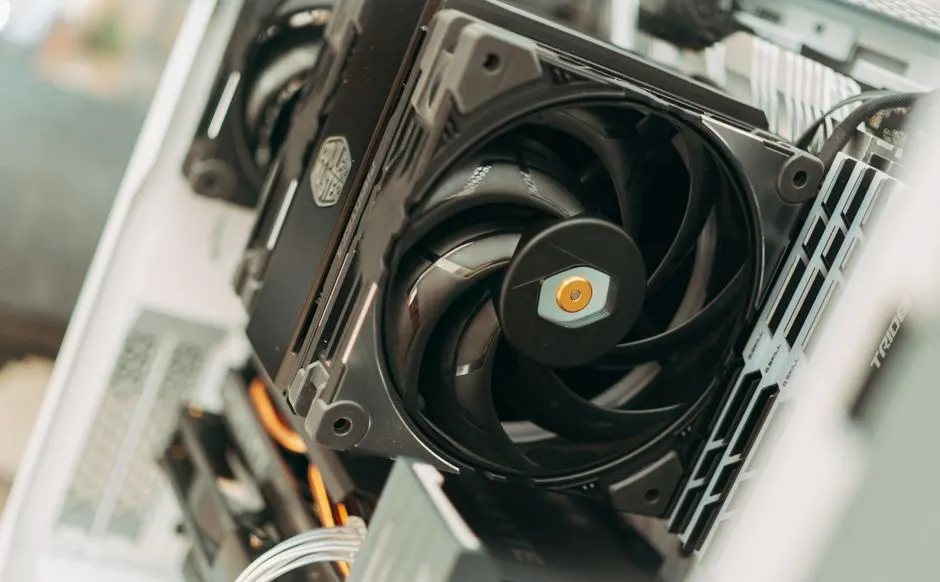
Houston summer heat is the single biggest killer of game consoles in this city, and the fix starts before the first 100°F day. Game console summer heat Houston TX damage is not about one hot afternoon - it is about 90 consecutive days of 95°F-plus ambient temperatures that push your console's internal thermal paste, fan, and power supply past their design limits. If your console already runs loud or shuts down mid-game, you are one heat wave away from a repair bill. This guide covers the specific prep steps for PS5, Xbox, and Switch owners in Houston, what our technicians see in June versus October, and when to stop guessing and bring it in.
Why Houston heat kills consoles faster than anywhere else
Houston's average July high is 95°F, and the heat index regularly hits 108°F to 112°F between 11 a.m. and 6 p.m. That is the outdoor number. Inside a typical Houston apartment or home without a dedicated gaming room, the ambient temperature where your console sits can be 82°F to 88°F even with the AC running. Add the console's own heat output - a PS5 pulls 200 to 220 watts under load - and the internal air temperature inside the chassis climbs past 140°F.
Thermal paste degrades faster at those temperatures. A console that would last five years in Seattle starts showing thermal throttling in two to three Houston summers. We see it in our shop every June: consoles that ran fine in March suddenly sound like a jet engine by Memorial Day.
The humidity matters too. Houston sits at 70% to 80% relative humidity for most of the summer. That moisture gets pulled into the console with the cooling air, and over time it accelerates corrosion on the fan bearings and power supply capacitors. It is why game console fan and cooling repair Houston TX is our most-booked service from May through September.
How to prepare your game console for Houston summer heat
Preparing your game console for Houston summer heat means three things: clean the intake path, drop the room temperature where the console sits, and give the exhaust somewhere to go. Do those three before June and you cut your overheating risk by more than half.
Start with the intake. Unplug the console, remove the side panels if your model allows it, and look at the fan and heatsink fins with a flashlight. If you see a grey felt-like mat of dust, that is your problem. A can of compressed air at a 45-degree angle, short bursts, gets the loose stuff out. Do not spin the fan with the air - you will burn the bearing.
Next, measure the space around the console. Sony recommends at least 4 inches of clearance on all sides for the PS5, and Microsoft says 5 inches for the Series X. In Houston, double those numbers. The air coming out of the exhaust is 120°F to 130°F. If it is recirculating back into the intake because the console is in a closed cabinet, you are cooking it.
Finally, drop the room temp. A console in an 85°F room runs 15°F to 20°F hotter internally than the same console in a 72°F room. If you do not have central AC in your game room, a $60 window unit or a $120 portable AC pays for itself the first time it saves you a $180 repair.
PS5 cooling Houston: the specific weak points
PS5 cooling Houston owners need to know one thing: the liquid metal thermal interface on the APU is the failure point, not the fan. Sony used liquid metal instead of paste on the PS5, and it works extremely well - until it does not. In Houston heat, we see liquid metal dry out and migrate off the die in about 18 to 24 months of heavy use.
Signs it is happening: the console gets loud within 10 minutes of launching a game, frame rates drop in demanding titles, and eventually you get the overheating warning screen. If you catch it early, a PS5 repair Houston with a liquid metal reapplication runs $120 to $180 in 2026 and takes our bench about 90 minutes. If you wait until the console shuts down, you are looking at a motherboard-level repair that starts at $250.
Vertical versus horizontal matters less than people think. What matters is the surface. A PS5 standing on carpet pulls in lint and dust twice as fast as one on a hard shelf. Put it on a hard surface, and if you must stand it vertical, give it 6 inches of clearance above the top vents.
Xbox cooling Houston Texas: what Series X and One owners miss
Xbox cooling Houston Texas is a different animal because the Series X uses a single large axial fan pulling air from the bottom and pushing it out the top. That design is efficient, but it means the console pulls every dust particle off your floor. In a Houston home with pets or carpet, that fan clogs in 8 to 12 months.
The Series X also has a known thermal paste issue on the APU. Microsoft used standard paste, and it dries out faster than the PS5's liquid metal. When it dries, the console still runs - it just runs hot and loud. Most owners do not notice until the fan is at 100% during a menu screen.
Xbox One and One X consoles are older and more vulnerable. Their power supply is internal, and the capacitors in that supply are the first thing to fail in Houston heat. If your Xbox One shuts off randomly after 30 to 45 minutes of play, that is a power supply symptom, not a game bug. Bring it in before it takes the motherboard with it.
Console cooling Houston summer: room setup and airflow
Console cooling Houston summer is 70% about where the console sits and 30% about the console itself. Here is the setup we recommend to every customer:
- Hard surface only. No carpet, no fabric, no shelf liner that blocks the bottom vents.
- Open-air shelf. If it is in a media cabinet, the cabinet needs a 4-inch hole in the back or an open back panel. Closed cabinets in Houston are console killers.
- Keep it off the floor. Heat rises, but dust settles. A console 18 inches off the floor pulls 60% less dust than one on the bottom shelf.
- Do not stack consoles. Two consoles in the same cabinet double the ambient heat. Give each one its own bay.
- Point a small fan at the intake. A $20 desk fan moving air across the intake side drops internal temps by 8°F to 12°F. It is the cheapest cooling upgrade you can make.
If you live in an older Houston home - pre-1980 construction in Game Console Repair in The Heights or similar neighborhoods - your AC may struggle to hold 78°F in August. Those homes have thinner insulation and older ductwork. In that case, a dedicated window unit for the game room is not a luxury, it is console insurance.
Common mistakes that cook consoles
The number one mistake we see is owners waiting until the console shuts down before they bring it in. By then, the damage has moved from the fan and thermal paste to the APU or GPU. A $120 cleaning and repaste becomes a $300 motherboard repair.
The second mistake is using a vacuum cleaner on the vents. Vacuums generate static electricity that can fry the motherboard. Never put a vacuum nozzle inside a console. Compressed air only, and hold the can upright.
The third mistake is ignoring the power supply. In Houston heat, a console that shuts off randomly is usually a power supply issue, not an overheating issue. If you keep playing through those shutdowns, you risk a surge that takes the whole board. A game console power jack repair Houston TX is a $90 to $140 fix. A new console is $500.
The fourth mistake is buying a third-party cooling fan that clips onto the back. Most of them pull power from the console's USB port and push air the wrong direction. They make the problem worse. We have tested a dozen of them on our bench. None of them beat a clean console in a 72°F room.
When to call a professional
If your console is more than 18 months old and has never been opened, it needs a professional cleaning before summer. We pull the heatsink, clean the fins, replace the thermal interface, and test the fan under load. That service runs $80 to $150 depending on the model, and it adds two to three years to the console's life in Houston conditions.
If you are already seeing shutdowns, loud fan noise within 10 minutes, or graphical artifacts, stop playing. Those are signs of heat damage that gets worse every time you power on. Our team at Game Console Repair Houston TX handles console overheating prevention near me Houston calls all summer, and we can usually turn a cleaning and repaste around same day.
For consoles that have already overheated to the point of failure, we offer game console overheating repair Houston TX with a full diagnostic. We will tell you what failed, what it costs to fix, and whether it is worth fixing versus replacing. No guesswork.
Frequently Asked Questions
How to prepare game console for Houston summer heat?
Clean the intake and fan with compressed air, give the console 4 to 6 inches of clearance on all sides, keep the room at 72°F to 75°F, and place it on a hard surface off the floor. If it is over 18 months old, get a professional cleaning and thermal repaste before June.
Where to get console cooling in Houston TX?
Game Console Repair Houston offers fan cleaning, thermal repaste, and full cooling system repair for PS5, Xbox, and Switch. We are open six days a week and most cooling services are same-day. Call +1 832-581-0001 to check current turnaround.
Can I prevent PS5 overheating in Houston?
Yes. Keep the PS5 on a hard surface with 6 inches of clearance above the top vents, clean the intake monthly during summer, and have the liquid metal thermal interface checked every 18 to 24 months. Those three steps prevent 90% of the PS5 overheating cases we see.
Who helps with console heat issues near me Houston?
Our technicians at Game Console Repair Houston handle console heat issues daily from May through September. We service all major brands and can diagnose overheating, random shutdowns, and fan noise in under an hour. Walk-ins welcome during business hours.
How hot is too hot for a game console in Houston?
If the air coming out of your console's exhaust is above 130°F, or if the room where it sits is above 80°F, you are in the danger zone. Internal components start throttling at 185°F and shut down at 195°F to 200°F to prevent permanent damage.
Get help with Game Console Repair in Houston
Houston summer is not getting cooler, and your console is not getting younger. Whether you need a pre-summer cleaning, a thermal repaste, or a full overheating repair, our team can get you back to playing without the shutdowns.
Call Game Console Repair Houston at +1 832-581-0001 to schedule your summer prep or ask about same-day cooling service.